> For the complete documentation index, see [llms.txt](https://docs.duplocloud.com/docs/llms.txt). Markdown versions of documentation pages are available by appending `.md` to page URLs; this page is available as [Markdown](https://docs.duplocloud.com/docs/automation-platform/kubernetes-overview/configs-and-secrets/adding-secretproviderclass-custom-resource.md).
# Creating the SecretProviderClass Custom Resource to mount secrets
Creating K8s SecretProviderClass CRs in the DuploCloud Portal
DuploCloud Portal provides the ability to create Custom Resource (CR) `SecretProviderClass`.
This capability allows Kubernetes (K8s) to mount secrets stored in external secrets stores into the Pods as volumes. After the volumes are attached, the data is mounted into the container’s file system.
## Prerequisites
An Administrator must set the Infrastructure setting `Enable Secrets CSI Driver` as `True`. This setting is available by navigating to **Administrator** -> **Infrastructure**, selecting your Infrastructure, and clicking **Settings**).
## Creating the K8s SecretProviderClass
1. In the DuploCloud Portal, navigate to **Kubernetes** -> **Secret Provider.**
2. Click **Add**. The **Add Kubernetes Sercet Provider Class** page displays.
3. Map the AWS Secrets and SSM Parameters (configured in the DuploCloud Portal under Cloud **Services** → **App Integration**) to the Parameters section of the configuration.
* If you haven’t already created the AWS Secret, see [AWS Secrets](broken://pages/SS4iP5vBBtVy7TsLkKbW) for instructions.
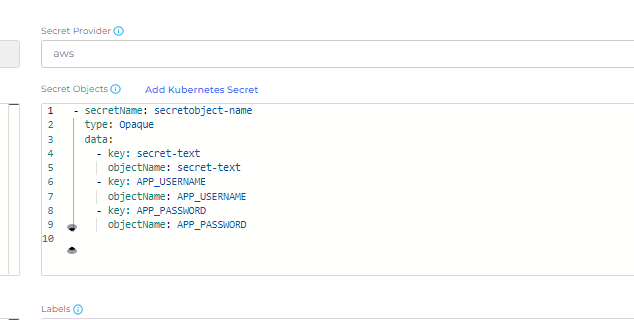
4. Optionally, use the **Secret Objects** field to define the desired state of the synced Kubernetes secret objects.
The following is an example `SecretProviderClass` configuration where AWS secrets and Kubernetes Secret Objects are configured:

## **Creating a Kubernetes Service and mounting** volumes based on the configured secrets
To ensure your application is using the Secrets Store CSI driver, you need to configure your deployment to reference the `SecretProviderClass` resource created in the previous step.
The following is an example of configuring a Pod to mount a volume based on the `SecretProviderClass` created in prior steps to retrieve secrets from Secrets Manager.
{% hint style="warning" %}
It's important to note that SPC timeouts can occur due to issues related to Secret Auto Rotation, which is enabled by default. This feature checks every two (2) minutes if the secrets need to be updated from the values in AWS Secrets Manager. During a service deployment, if a secret is deleted due to a redeployment while a rotation check is attempted, it can lead to timeouts. This deletion happens because the secret is generated from the volume mount in the service Pod, and when the Pod is destroyed, the secret is also destroyed.
{% endhint %}
1. In the DuploCloud Portal, create a Kubernetes Service by navigating to **Kubernetes** -> **Services** and clicking **Add**.
2. Complete the required fields and click **Next** to display the **Advanced Options** page.

3. On the **Advanced Options** page, in the **Cloud Credentials** list box, select **From Kubernetes**.
4. Add code to the **Other Pod Config** field, as in the example below.
5. Add code for `VolumeMounts` in the **Other Container Config** field, as in the example below.
6. Click **Create** to create the Kubernetes service.
{% code title="Other Pod Config field" %}
```yaml
Volumes:
- Name: secretvolume-name
Csi:
driver: secrets-store.csi.k8s.io
readOnly: true
VolumeAttributes:
secretProviderClass: my-secret-provider-class
```
{% endcode %}
{% code title="Other Container Config field" %}
```yaml
VolumesMounts:
- Name: secretvolume-name
MountPath: /mnt/secrets
readOnly: true
```
{% endcode %}

## Configure and use Kubernetes Secret Objects
{% hint style="info" %}
Before you can sync Kubernetes Secret Objects, you must [Create a Kubernetes Service and mount volumes based on the configured secrets](#create-a-kubernetes-service-and-mount-volumes-based-on-the-configured-secrets).
{% endhint %}
Optionally, you can define `secretObjects` in the `SecretProviderClass` to define the desired state of your synced Kubernetes secret objects.
The following is an example of how to create a `SecretProviderClass` CR that syncs a secret from AWS Secrets Manager to a Kubernetes secret:
### Configuring Secret Objects in deployments
In the **Other Container Config** field, specify mount details with the `secretobject-name`. Refer to the following example:
{% code title="Other Container Config field" %}
```yaml
VolumesMounts:
- Name: secretvolume-name
MountPath: /mnt/secrets
readOnly: true
EnvFrom:
- SecretRef:
Name: secretobject-name
```
{% endcode %}
### Configuring Secret Objects using Environment Variables
Set environment variables in your deployment to refer to your Kubernetes secrets.
Refer to the following example using the **Environment Variables** field in the **Basic Options** page when [creating a Service](#create-a-kubernetes-service-and-mount-volumes-based-on-the-configured-secrets).
{% code title="Environment Variables field" %}
```yaml
- name: SECRET_USERNAME
valueFrom:
secretKeyRef:
name: secretobject-name
key: secret-text
```
{% endcode %}
{% hint style="success" %}
While powerful, integrating secrets into Kubernetes deployments requires careful management to avoid issues such as SPC timeouts. Understanding the underlying mechanisms, such as Secret Auto Rotation and the lifecycle of secrets in Pod deployments, is crucial for smooth operations.
{% endhint %}
---
# Agent Instructions
This documentation is published with GitBook. GitBook is the documentation platform designed so that both humans and AI agents can read, navigate, and reason over technical content effectively. Learn more at gitbook.com.
## Querying This Documentation
If you need additional information that is not directly available in this page, you can query the documentation by asking a question.
Perform an HTTP GET request on the following URL with the `ask` and `goal` query parameters:
```
GET https://docs.duplocloud.com/docs/automation-platform/kubernetes-overview/configs-and-secrets/adding-secretproviderclass-custom-resource.md?ask=&goal=
```
`ask` is the immediate question: it should be specific, self-contained, and written in natural language.
`goal` is what the user is ultimately trying to achieve, the reason they need the answer. Sharing it helps GitBook give you a better, more relevant answer. A goal is most helpful when it describes the outcome the user wants rather than restating the question. For example, with `ask=how do I create an API token`, a goal like `automate deployments from our CI pipeline` lets GitBook tailor the answer to that use case.
The response will contain a direct answer to the question and relevant excerpts and sources from the documentation.
Use this mechanism when the answer is not explicitly present in the current page, you need clarification or additional context, or you want to retrieve related documentation sections.