# Helm Charts

[Helm Charts](https://helm.sh/docs/topics/charts/) are packages of pre-configured Kubernetes resources that help you define, install, and upgrade Kubernetes applications. You can integrate Helm Charts with DuploCloud to deploy applications onto the Kubernetes clusters you've created in DuploCloud. For Helm Charts general guidance and best practices, see the [Helm Charts Info](https://docs.duplocloud.com/docs/extras-overview/helm-charts) page in the DuploCloud Extras section.

{% hint style="info" %}
Helm Charts are only supported for administrator-level DuploCloud users.
{% endhint %}

## **Prerequisites**

* Ensure you have a Kubernetes cluster set up in DuploCloud.
* [Install Helm](https://github.com/helm/helm/releases) on your local machine or a machine with access to your Kubernetes cluster.

## **Creating Helm Charts**

Identify the Helm charts you want to use for deploying your applications or services.

You can use community-maintained charts from public repositories like [Artifact Hub](https://artifacthub.io/), or you can create your own custom charts tailored to your specific needs.

To create custom Helm charts, modify the values.yaml or create custom templates as necessary. This might involve configuring resource limits, environment variables, or other settings specific to your deployment.

You can also modify Helm Chart values using the node selector. This is the most common method. For example, to deploy a chart into the duploservices-mytenant Tenant using the node selector, give:

{% code fullWidth="false" %}

```yaml
nodeSelector:
  tenantname: duploservices-mytenant
```

{% endcode %}

To specify which hosts the chart should run on using the node selector with allocation tags, give:

```yaml
nodeSelector:
  tenantname: duploservices-mytenant
  allocationtags: mychart
```

## **Adding Helm Repositories in DuploCloud**

Add Helm chart repositories so you can deploy applications to your Kubernetes clusters. When adding a repository, you’ll select the repository type. You can choose standard Helm repositories, which use a catalog (`index.yaml`) to list charts, or OCI repositories, which allow certain OCI-compliant registries to be treated like Helm repositories. Once the repository is added, its charts become available for deploying Helm releases in your clusters.

To add a Helm repository in the DuploCloud Portal:

1. Navigate to **Kubernetes** -> **Helm**.
2. Select the **Repository** tab, and click **Add**. The **Add Helm Repository** pane displays.

<div align="left"><figure><img src="https://2471407984-files.gitbook.io/~/files/v0/b/gitbook-x-prod.appspot.com/o/spaces%2F68cb0s9ce5UIUKWPuYs8%2Fuploads%2FKp7n3beW7pgx7zo0nE7M%2FScreenshot%20(856).png?alt=media&#x26;token=59ff49fa-80b1-483f-8510-21f4ee63eee0" alt=""><figcaption><p><strong>Add Helm Repository</strong> pane</p></figcaption></figure></div>

3. Complete the following fields:

<table data-header-hidden><thead><tr><th width="206.88885498046875"></th><th></th></tr></thead><tbody><tr><td><strong>Name</strong></td><td>Enter a friendly name for the repository.</td></tr><tr><td><strong>Interval (MM:SS)</strong></td><td>Select how often DuploCloud should check for changes in the repository and reconcile them in the Kubernetes cluster, e.g., <strong>05:00</strong>.</td></tr><tr><td><strong>Repository Type</strong></td><td>Choose the type of repository. Select <strong>Helm Repository</strong> or <strong>OCI Repository</strong> (select OCI to treat certain OCI registries as Helm repos).</td></tr><tr><td><strong>Repository URL</strong></td><td>Enter the full URL of the Helm repository or OCI registry that hosts the chart (e.g., <code>https://charts.bitnami.com/bitnami</code> or <code>oci://registry-1.docker.io/bitnamicharts</code>).</td></tr></tbody></table>

4. Click **Create**. The Helm repository is added.

## Managing Helm Repositories

Once you've added a Helm repository, you can view its details, update its configuration, or delete from directly in the DuploCloud Portal.

1. Navigate to **Kubernetes** → **Helm.**
2. Select the **Helm Repository** tab.
3. Click the menu icon (<img src="https://2471407984-files.gitbook.io/~/files/v0/b/gitbook-x-prod.appspot.com/o/spaces%2F68cb0s9ce5UIUKWPuYs8%2Fuploads%2F2zCpjpPJBxCltuVCLA89%2Fmenu%20icon.avif?alt=media&#x26;token=85eee83d-9971-4469-9bcd-61a43626d0fb" alt="" data-size="line">) in the row of the repository you want to manage.
4. Choose one of the following actions:

<table data-header-hidden><thead><tr><th width="146.4444580078125">Option</th><th>Description</th></tr></thead><tbody><tr><td><strong>View</strong></td><td>View the repository’s current configuration, sync status, and metadata.</td></tr><tr><td><strong>Update</strong></td><td>Edit the repository name, URL, sync interval, or authentication settings.</td></tr><tr><td><strong>Delete</strong></td><td>Remove the repository from DuploCloud. Releases that depend on it will no longer reconcile.</td></tr></tbody></table>

{% hint style="info" %}
Deleting a Helm repository will not remove any releases that were deployed from it, but those releases will no longer reconcile unless the repository is re-added.
{% endhint %}

## **Deploying a Helm Release**

Deploy a Kubernetes cluster using a Helm Chart from the DuploCloud Platform.

1. From the DuploCloud Portal, navigate to **Kubernetes** → **Helm**.
2. Select the **Release** tab, and click **Add**. The **Add Helm Release** page displays

<figure><img src="https://2471407984-files.gitbook.io/~/files/v0/b/gitbook-x-prod.appspot.com/o/spaces%2F68cb0s9ce5UIUKWPuYs8%2Fuploads%2FfWqginoQqPZwaYA5beE6%2FScreenshot%20(1127).png?alt=media&#x26;token=d7047ee8-6737-446e-8afb-78964932c7af" alt=""><figcaption><p><strong>Add Helm Release</strong> page in the DuploCloud Portal</p></figcaption></figure>

3. Complete the following fields.

<table data-header-hidden><thead><tr><th width="195.33331298828125"></th><th></th></tr></thead><tbody><tr><td><strong>Name</strong></td><td>Enter a unique name for this Helm release (e.g., <code>nginx-release</code>).</td></tr><tr><td><strong>Release Name</strong></td><td>Enter the name to identify the application deployment in Kubernetes (e.g., <code>nginx-release</code>).</td></tr><tr><td><strong>Interval (MM:SS)</strong></td><td>Set the time interval for periodic reconciliation of the release (e.g., <code>02:00</code>).</td></tr><tr><td><strong>Source Type</strong></td><td>Choose where the Helm chart is stored (e.g., <strong>HelmRepository</strong> or <strong>OCIRepository</strong>).</td></tr><tr><td><strong>Source Name</strong></td><td>Select the name of the Helm repository or OCI source to use for this release.</td></tr><tr><td><strong>Reconcile Strategy</strong> (Helm Repositories only)</td><td><p>Select how Helm should ensure the deployment stays consistent with the source chart:<br></p><ul><li><strong>Chart Version (default)</strong> – Select this option to produce a new chart artifact only when the chart version changes in the Helm repository. Updates to the source without a version change will be ignored.</li><li><strong>Revision</strong> – Select this option to produce a new chart artifact whenever the source revision changes, even if the chart version remains the same.</li></ul></td></tr><tr><td><strong>Name</strong> (Helm Repositories only)</td><td>Specify the name of the Helm chart to use (e.g., <code>nginx</code>).</td></tr><tr><td><strong>Version</strong> (Helm Repositories only)</td><td>Specify the Helm chart version (e.g., <strong>15.1.0</strong>).</td></tr><tr><td><strong>Interval (MM:SS)</strong> (Helm Repositories only)</td><td>Set how often the tool checks for updates in the repository and reconciles changes in the cluster (e.g., <strong>02:00</strong>).</td></tr><tr><td><strong>Values</strong></td><td>Add any custom configuration values in YAML format to override chart defaults (e.g., <strong>replicaCount: 2</strong>).</td></tr><tr><td><strong>ValuesFrom</strong></td><td>Optionally, specify an external source (e.g., a ConfigMap or Secret) to provide values, instead of entering them directly in the <strong>Values</strong> field.</td></tr><tr><td><strong>Labels</strong></td><td>Enter key-value pairs to assign metadata to the Helm release. To ensure the release appears in the Kubernetes <strong>Apps</strong> dashboard, add an app name using the format: <code>app.duplocloud.net/app-name: "&#x3C;app name>"</code>.</td></tr></tbody></table>

4. Click **Add** to deploy the Helm release. To check the status of your release, navigate to **Kubernetes** → **Helm** and select the **Release** tab.

<figure><img src="https://2471407984-files.gitbook.io/~/files/v0/b/gitbook-x-prod.appspot.com/o/spaces%2F68cb0s9ce5UIUKWPuYs8%2Fuploads%2FwI55EGYH9xNXeOEjy6XZ%2FScreenshot%20(1131).png?alt=media&#x26;token=bf279988-bccb-4da4-8462-128754a02975" alt=""><figcaption><p><strong>Release</strong> tab on the Kubernetes <strong>Helm</strong> page</p></figcaption></figure>

## **Viewing Helm Deployments**

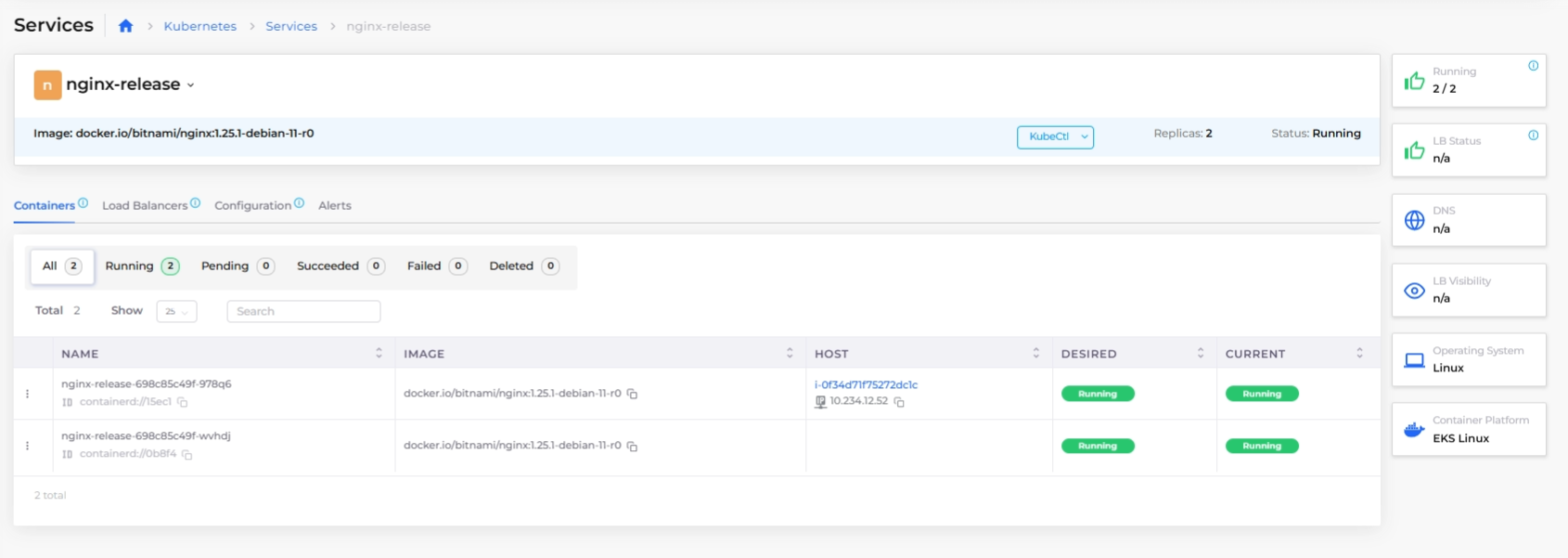
Navigate to the **Services** page (**Kubernetes** → **Services**) to view a list of all deployed services, including those created using Helm Charts. Use this view to confirm that the service has deployed without errors and all components are running as expected.

* Helm-deployed services are displayed in **read-only mode**. This means:
  * You can **view details** (e.g., replicas, resource allocation, logs) to confirm that the service is functioning as expected.
  * However, you **cannot modify the service** directly in DuploCloud. Any changes to the service must be made by updating the Helm chart and redeploying it.

<figure><img src="https://2471407984-files.gitbook.io/~/files/v0/b/gitbook-x-prod.appspot.com/o/spaces%2F68cb0s9ce5UIUKWPuYs8%2Fuploads%2FvNnXHu72oO5UppAUpZ8R%2Fhelm%20release%20services.png?alt=media&#x26;token=4b131abb-bf00-428f-bf3a-a1eda4080e5d" alt=""><figcaption><p>Kubernetes <strong>Services</strong> page with the read-only nginx-release Service highlighted</p></figcaption></figure>

Click on the name of the Service in the **NAME** column to view details.

<figure><img src="https://2471407984-files.gitbook.io/~/files/v0/b/gitbook-x-prod.appspot.com/o/spaces%2F68cb0s9ce5UIUKWPuYs8%2Fuploads%2Fs7vbXyIzxKFx2p48GMAS%2FHELM%20SERVICE%20DETAILS.png?alt=media&#x26;token=30093014-b7da-4830-8ed1-dd3dabfdb022" alt=""><figcaption><p>The details page for the Service created using Helm Charts</p></figcaption></figure>


---

# Agent Instructions: Querying This Documentation

If you need additional information that is not directly available in this page, you can query the documentation dynamically by asking a question.

Perform an HTTP GET request on the current page URL with the `ask` query parameter:

```
GET https://docs.duplocloud.com/docs/automation-platform/kubernetes-overview/helm/helm-charts.md?ask=<question>
```

The question should be specific, self-contained, and written in natural language.
The response will contain a direct answer to the question and relevant excerpts and sources from the documentation.

Use this mechanism when the answer is not explicitly present in the current page, you need clarification or additional context, or you want to retrieve related documentation sections.