# GKE Containers and Services

{% hint style="info" %}
For an end-to-end example of creating an GKE Service, see this [tutorial](/docs/automation-platform/overview-1/quick-start.md).
{% endhint %}

## Creating a DuploCloud GKE Service

1. In the DuploCloud Portal, navigate to **Kubernetes** -> **Services**.
2. Click **Add**. The **Basic Options** section of the **Add Service** page displays.
3. In the **Service Name** field, give the Service a name (without spaces).
4. From the **Cloud** list box, select **Google**.
5. From the **Platform** list box, select **GKE Linux**.
6. In the **Docker Image** field, enter the Docker image.
7. Optionally, enter any allocation tags in the **Allocation Tag** field.
8. From the **Replica Strategy** list box, select a replication strategy. Refer to the informational ToolTip ( <img src="https://docs.duplocloud.com/~gitbook/image?url=https%3A%2F%2F2471407984-files.gitbook.io%2F%7E%2Ffiles%2Fv0%2Fb%2Fgitbook-x-prod.appspot.com%2Fo%2Fspaces%252F68cb0s9ce5UIUKWPuYs8%252Fuploads%252FxM3pXz5cUSUlHq5qDBWY%252Finfo_tip_black.png%3Falt%3Dmedia%26token%3D1694a38c-92f8-4443-81f9-d465b3f968c8&#x26;width=41&#x26;dpr=4&#x26;quality=100&#x26;sign=cae4f194&#x26;sv=1" alt="" data-size="line"> ) for more information.
9. Specify the number of replicas in the **Replicas** field (for Static replica strategy). The number of replicas you define must be less than or equal to the number of Hosts in the fleet.
10. In the **Replica Placement** list box (for Static or Horizontal Pod Autoscaler replication strategies) select **First Available**, **Place on Different Hosts**, **Spread Across Zones**, or **Different Hosts and Spread Across Zones**. Refer to the informational ToolTip ( <img src="https://docs.duplocloud.com/~gitbook/image?url=https%3A%2F%2F2471407984-files.gitbook.io%2F%7E%2Ffiles%2Fv0%2Fb%2Fgitbook-x-prod.appspot.com%2Fo%2Fspaces%252F68cb0s9ce5UIUKWPuYs8%252Fuploads%252FxM3pXz5cUSUlHq5qDBWY%252Finfo_tip_black.png%3Falt%3Dmedia%26token%3D1694a38c-92f8-4443-81f9-d465b3f968c8&#x26;width=41&#x26;dpr=4&#x26;quality=100&#x26;sign=cae4f194&#x26;sv=1" alt="" data-size="line"> ) for more information.
11. Optionally, enter variables in the **Environmental Variables** field.
12. In the **Force StatefulSets** list box, select **Yes** or **No** (for Static or Horizontal Pod Autoscaler replication strategies).
13. Optionally, select **Tolerate spot instances** (for Static or Horizontal Pod Autoscaler replication strategies)

<figure><img src="/files/eaydrDprywMLfYWpqHjq" alt=""><figcaption><p>The <strong>Add Service, Basic Options</strong> page</p></figcaption></figure>

14. Click **Next.** The **Add Service, Advanced Options** page displays.
15. Configure advanced options as needed. For example, you can implement [Kubernetes Lifecycle Hooks](/docs/automation-platform/kubernetes-overview/kubernetes-lifecycle-hooks.md) in the **Other Container Config** field (optional).
16. Click **Create**. The Service is created.

## Viewing Services <a href="#id-7-toc-title" id="id-7-toc-title"></a>

1. From the DuploCloud Portal, navigate to **Kubernetes** -> **Services**. Select the Service from the **NAME** column. The Service details page displays.

<figure><img src="/files/Zewba7MNnLzI5kXPreZo" alt=""><figcaption><p>The <strong>Service</strong> details page</p></figcaption></figure>

## Starting, Stopping, and Restarting Multiple DuploCloud Services <a href="#id-7-toc-title" id="id-7-toc-title"></a>

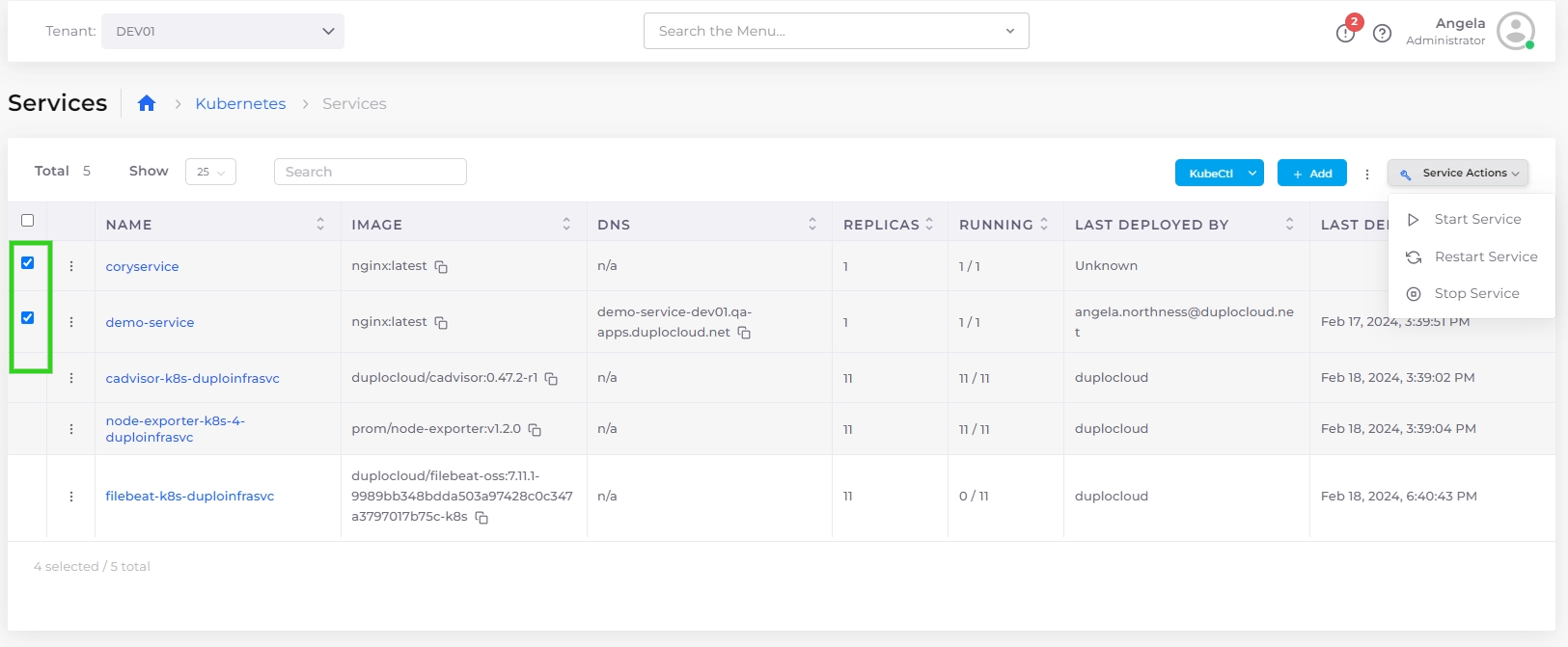
Using the Services page, you can start, stop, and restart multiple services simultaneously.

1. In the DuploCloud Portal, navigate to **Kubernetes** -> **Services**.
2. Use the checkbox column to select multiple services you want to start or stop at once.
3. From the **Service Actions** menu, select **Start Service**, **Stop Service**, or **Restart Service**. The selected Services are started, stopped, or restarted as you specified.

<figure><img src="/files/pc6qwRCxIyhrLueGN2n2" alt=""><figcaption></figcaption></figure>

## Managing Kubernetes Containers

In the DuploCloud Portal, you can display and manage the containers you have defined.

1. Select the Tenant from the **Tenan**t list box in the upper left.
2. Navigate to **Kubernetes** -> **Containers.**
3. Select the Options Menu ( <img src="/files/7DagHksotNef8625xoXr" alt="" data-size="line"> ) in each container row to display **Logs**, **State**, **Container Shell**, **Host Shell,** and **Delete** options.

<table><thead><tr><th width="374">Option</th><th>Functionality</th></tr></thead><tbody><tr><td><strong>Logs</strong></td><td>Displays container logs.</td></tr><tr><td><strong>State</strong></td><td>Displays container state configuration, in YAML code, in a separate window.</td></tr><tr><td><strong>Container Shell</strong></td><td>Accesses the Container Shell. To access the <strong>Container Shell</strong> option, you must first set up <a href="/pages/EfdlJcPqrEXr3HjQAtfk">Shell access for Docker</a>.</td></tr><tr><td><strong>Host Shell</strong></td><td>Accesses the Host Shell.</td></tr><tr><td><strong>Delete</strong></td><td>Deletes the container.</td></tr></tbody></table>

<figure><img src="/files/1jRgxYpItvCaBPQYWD7d" alt=""><figcaption><p>The <strong>Kubernetes Containers</strong> page</p></figcaption></figure>


---

# Agent Instructions: Querying This Documentation

If you need additional information that is not directly available in this page, you can query the documentation dynamically by asking a question.

Perform an HTTP GET request on the current page URL with the `ask` query parameter:

```
GET https://docs.duplocloud.com/docs/automation-platform/overview-1/gcp-services/containers.md?ask=<question>
```

The question should be specific, self-contained, and written in natural language.
The response will contain a direct answer to the question and relevant excerpts and sources from the documentation.

Use this mechanism when the answer is not explicitly present in the current page, you need clarification or additional context, or you want to retrieve related documentation sections.