githubEdit

Azure Security Standards

Monitor Azure Security Standard compliance in the DuploCloud Platform

Azure Security Standards in DuploCloud help you monitor and improve the security posture of your Azure environment. They automatically check your Azure resources against Microsoft’s recommended best practices and identify potential risks, misconfigurations, and compliance gaps.

This feature includes two assessment views:

  • Microsoft Cloud Security Benchmark: organizes assessments by Microsoft’s benchmark controls, allowing you to drill down into each control’s assessments and underlying checks.

  • Azure CSPM: This feature is available to customers who have enabled the Cloud Security Posture Management (CSPM) add-on. It provides a summary of all CSPM assessments, showing counts of failed and total checks. You can expand each group to view detailed individual security assessments.

Viewing Microsoft Cloud Security Benchmark Results

The Microsoft Cloud Security Benchmark organizes your Azure security assessments into controls aligned with Microsoft’s security framework.

  1. In the DuploCloud Portal, navigate to Security -> Standards.

  2. Click the Microsoft Cloud Security Benchmark tab.

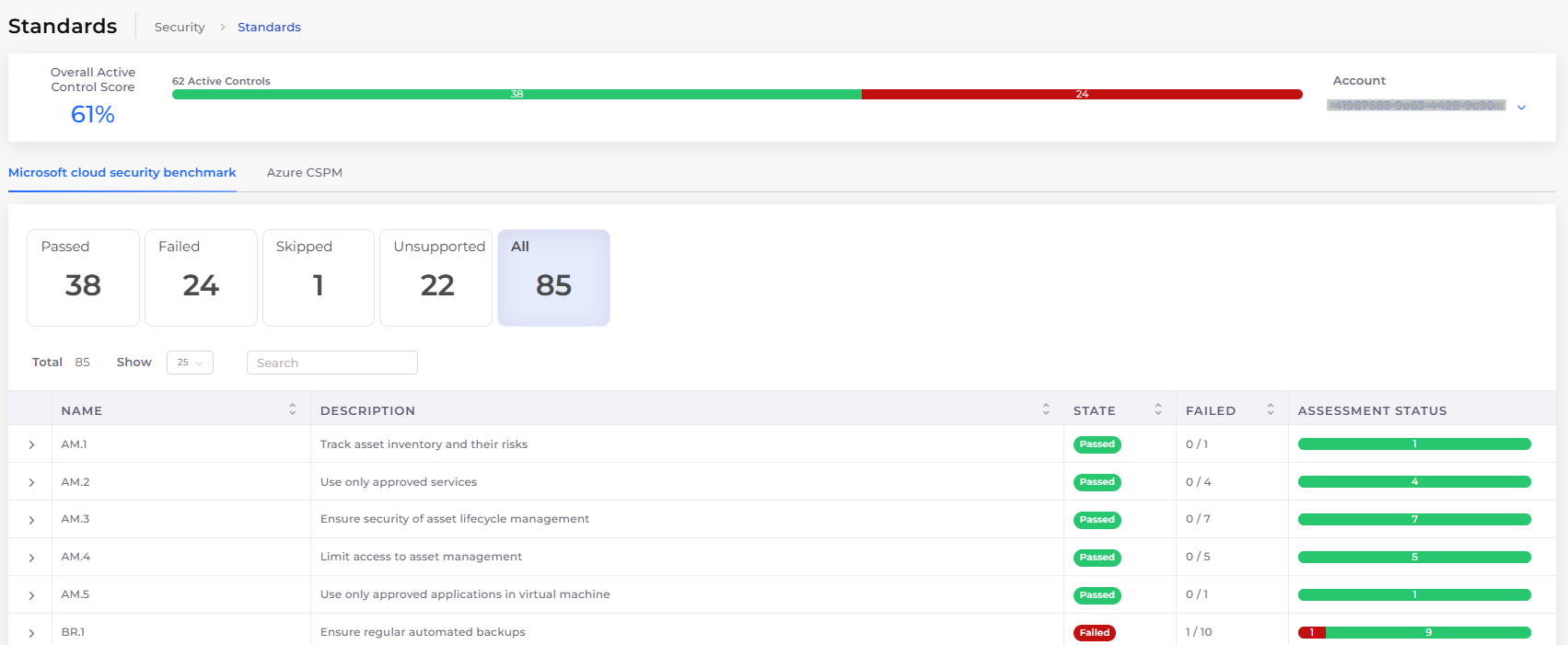
Microsoft Cloud Security Benchmark tab on the Azure Security Standards page

Once on the page, review the Overall Active Control Score and status summary at the top. You can use filters to view assessments by status: Passed, Failed, Skipped, Unsupported, or All.

Further down the page, you’ll find a list of benchmark controls (e.g., AM.1, BR.2). Click the arrow next to any control to expand and view a list of individual assessments.

Microsoft Cloud Security Benchmark tab with assessment details expanded

This hierarchical view helps you track compliance with Microsoft’s security benchmark categories while accessing detailed findings for each control.

Viewing Azure CSPM Assessments

The Azure CSPM tab provides a comprehensive summary of security assessments for your Azure environment. This tab is available only for customers with the Cloud Security Posture Management (CSPM) add-on enabled.

  1. In the DuploCloud Portal, navigate to Security -> Standards.

  2. Click the Azure CSPM tab.

    Azure CSPM tab on the Azure Security Standards page

Once on the page, review the Overall Active Control Score and status summary at the top. You can use filters to view assessments by status: Passed, Failed, Skipped, Unsupported, or All.

Below the summary, you'll find one or more assessment group rows, each representing a collection of related security checks. You can click the arrow next to a group row to expand and view the individual assessments within it.

This layout provides a high-level overview combined with detailed drill-down capability, enabling you to prioritize and address security risks efficiently.

Last updated

Was this helpful?