githubEdit

Azure Container Registry (ACR)

Using Azure Container Registry for storage with DuploCloud

Azure Container Registry (ACR)arrow-up-right is a fully managed Docker container registry that allows you to store and manage private container images in Azure. ACR provides a central repository for containerized applications, enabling seamless integration with Azure Kubernetes Service (AKS), Azure App Service, and other container-based services.

Creating an Azure Container Registry

  1. Select the appropriate Tenant from the Tenant list box.

  2. Navigate to Cloud Services -> Storage.

  3. Select the Container Registry tab.

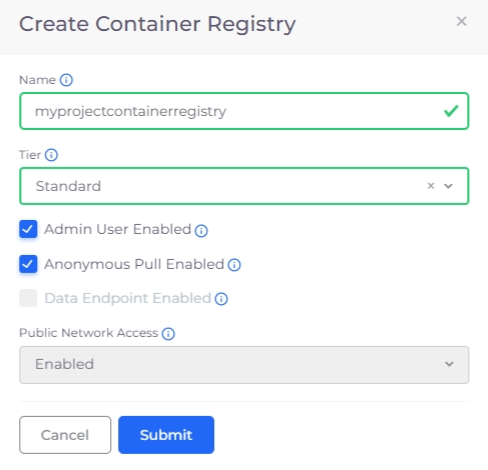
  4. Click Add. The Create Container Registry pane displays.

    The Create Container Registry pane
  5. Complete the following fields:

Name

Enter a name for the container registry.

Tier

Select the subscription tier e.g., Basic, Standard, Premium.

Admin User Enabled

Check this box to enable admin access.

Anonymous Pull Enabled

Check this box to allow anonymous pull access.

Data Endpoint Enabled

Check this box to enable a data endpoint for additional storage (Premium tier only).

Public Network Access

Choose to Enable or Disable public network access.

  1. Click Submit to create the Azure Container Registry.

Viewing Azure Container Registries

  1. Select the appropriate Tenant from the Tenant list box.

  2. Navigate to Cloud Services -> Storage.

  3. Select the Container Registry tab to view a list of Container Registries.

The Container Registry tab in the DuploCloud Portal

Last updated

Was this helpful?