# MySQL Flexible Server

Use a [Microsoft Azure MySQL Flexible Server](https://learn.microsoft.com/en-us/azure/mysql/flexible-server/overview) managed database service in DuploCloud. Flexible Server is designed for more granular control and flexibility over database management functions and configuration settings and allows users access to High Availability (HA) in both single availability zones and across multiple availability zones. Flexible servers provide better cost optimization and are ideal for workloads that don’t need continuous full-compute capacity.

## Creating a MySQL Flexible Server

1. In the DuploCloud Portal, navigate to **Cloud Services** -> **Database** -> **MySQL Flexible.**
2. Click **Add**. The **MySQL Flexible** page displays.
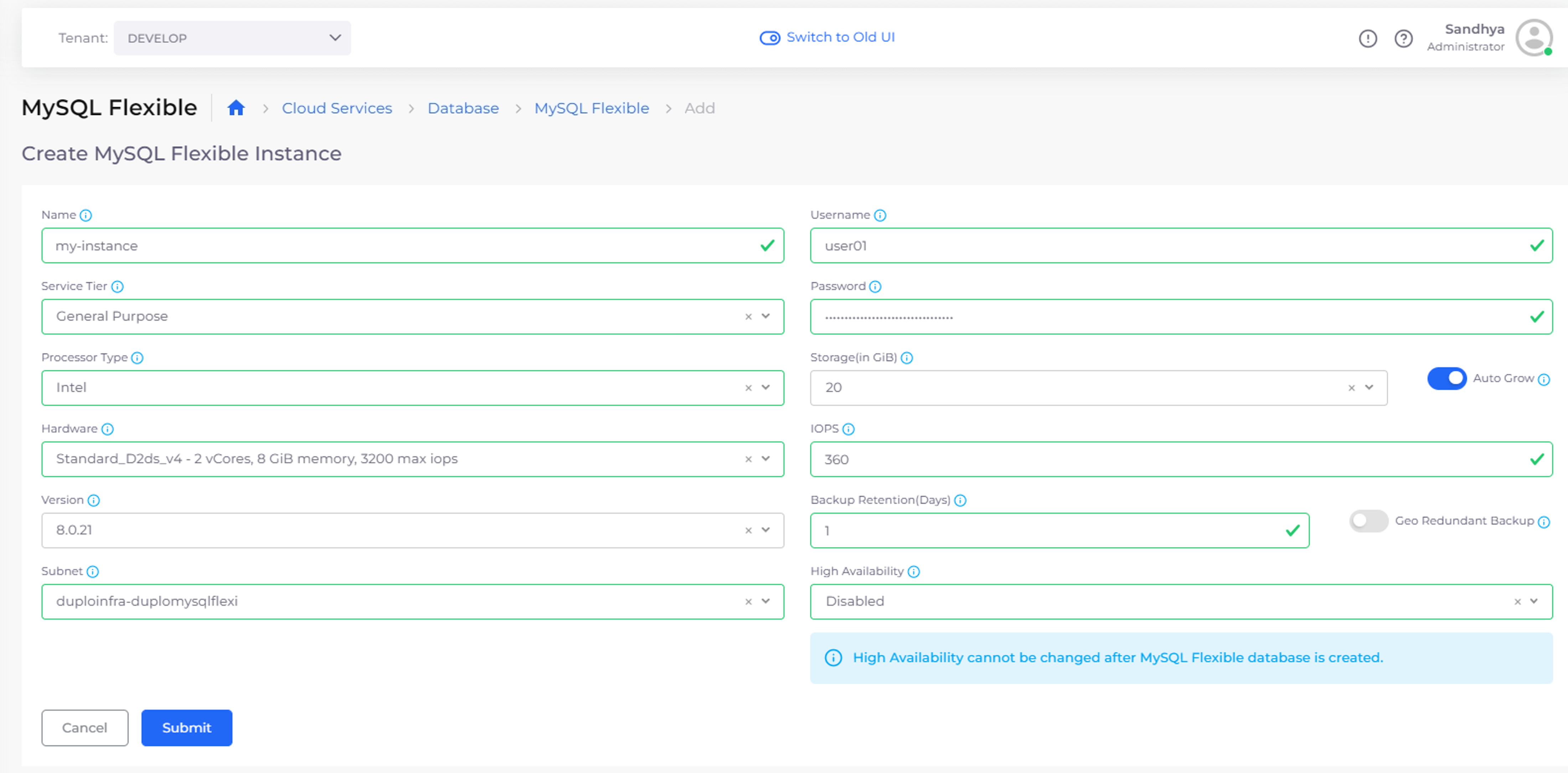
3. Provide the database **Name**, **User Name**, **Service Tier**, **Password**, Database **Version**, and other required fields. As you complete the fields on the page, additional fields display, such as **High Availability**, if applicable.
4. Click **Submit**.

{% hint style="warning" %}
You cannot change the value of the High Availability field, once the MySQL Flexible Server is created.
{% endhint %}

<figure><img src="/files/RYdYimoGrNsSHp80HeRT" alt=""><figcaption><p><strong>MySQL Flexible</strong> page</p></figcaption></figure>

## Setting up Database Backup

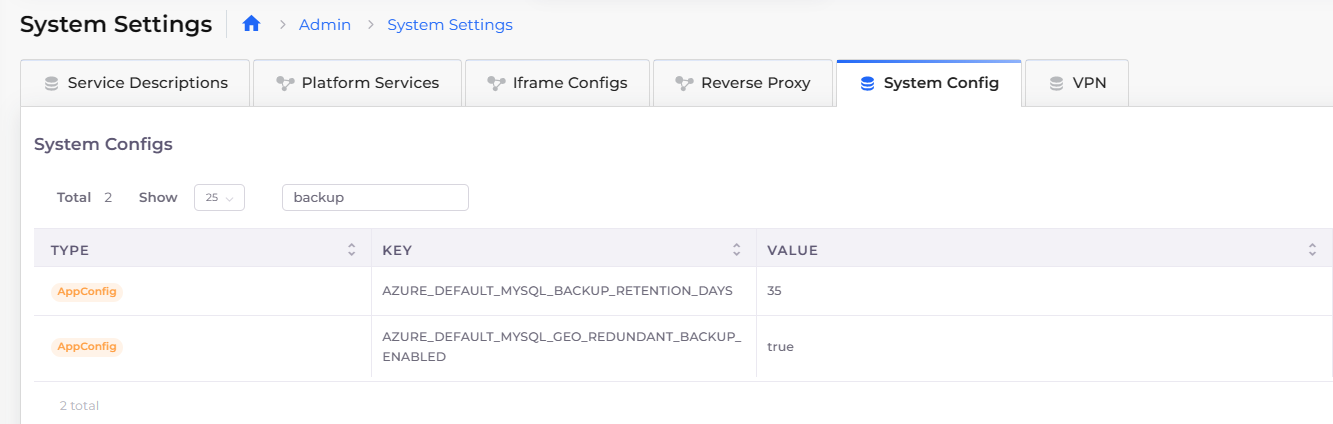
Setup Database Backup and choose the number of days (1-35) to backup databases in the DuploCloud Portal **System Settings**. First, enable Redundant Backup, and then set the Backup Retention Period.

### Enable Redundant Backup

1. In the DuploCloud Portal, navigate to **Administrator** -> **System Settings**.
2. Select the **System Config** tab.
3. Click **Add**. The **Add Config** pane displays.
4. From the **Config Type** list box, select **AppConfig**.
5. From the **Key** list box, select "**AZURE\_DEFAULT\_MYSQL\_GEO\_REDUNDANT\_BACKUP\_ENABLED**".
6. In the **Value** field, enter "**True**". Click **Submit**. Redundant backup is enabled.

<figure><img src="/files/j6gxsPVcufliPFr3ffZG" alt=""><figcaption><p>The <strong>Add Config</strong> pane filled to enable Azure Default Redundant Backup.</p></figcaption></figure>

### Set the Backup Retention Period

1. In the DuploCloud Portal, navigate to **Administrator** -> **System Settings**.
2. Select the **System Config** tab.
3. Click **Add**. The **Add Config** pane displays.
4. From the **Config Type** list box, select **AppConfig**.
5. From the **Key** list box, select "**AZURE\_DEFAULT\_MYSQL\_BACKUP\_RETENTION\_DAYS**".
6. In the **Value** field, enter the number of days to retain the backup, from one (**1**) to thirty-five (**35**).
7. Click **Submit.** Backup retention is configured for the selected number of days.

{% hint style="info" %}
Once set, the Backup Retention Period will apply to all new databases. When creating a new database, you can override this by entering a value into the **Backup Retention** field on the **Create MySQL Flexible Instance** page.
{% endhint %}

<figure><img src="/files/8v664c0rIzJEFg1TWVXo" alt=""><figcaption><p>The <strong>Add Confi</strong>g pane configured to retain backups for 35 days.</p></figcaption></figure>

<div align="left"><figure><img src="/files/1taURG1mfMeHorKhVhKI" alt=""><figcaption><p><strong>Systems Settings</strong> with <strong>System Config</strong> tab selected</p></figcaption></figure></div>

## Viewing a MySQL Flexible Server

You can view details and configure other options by selecting the MySQL Flexible Server you created, from the **MySQL Flexible** page in the DuploCloud Portal.

<figure><img src="/files/QhYTPJZpeKAzBpEG4TYT" alt=""><figcaption><p><strong>MySQL Flexible</strong> page with <strong>Overview</strong> tab displayed</p></figcaption></figure>

## Additional supported actions

From the **MySQL Flexible** page, you can click the **Actions** menu for each **Flexible Server** and select the appropriate option to enter the **Azure Portal**, **Reboot** the server, or **Stop** the server.

<figure><img src="/files/IhHoJxe2oxpPR7XugOix" alt=""><figcaption><p><strong>MySQL Flexible</strong> page with <strong>Actions</strong> menu expanded, displaying options for the <strong>MY-INSTANCE</strong> Flexible Server</p></figcaption></figure>


---

# Agent Instructions: Querying This Documentation

If you need additional information that is not directly available in this page, you can query the documentation dynamically by asking a question.

Perform an HTTP GET request on the current page URL with the `ask` query parameter:

```
GET https://docs.duplocloud.com/docs/automation-platform/overview-2/azure-services/databases/mysql-flexible-server.md?ask=<question>
```

The question should be specific, self-contained, and written in natural language.
The response will contain a direct answer to the question and relevant excerpts and sources from the documentation.

Use this mechanism when the answer is not explicitly present in the current page, you need clarification or additional context, or you want to retrieve related documentation sections.