# Shell Access for Containers

Enable and access shells for your DuploCloud Docker, EKS, and ECS containers directly through the DuploCloud Portal. This provides quick and easy access for managing and troubleshooting your containerized environments.

## Native Docker Shell Access

### Enabling the Shell for Docker

1. In the DuploCloud Portal, navigate to **Docker** -> **Services**.
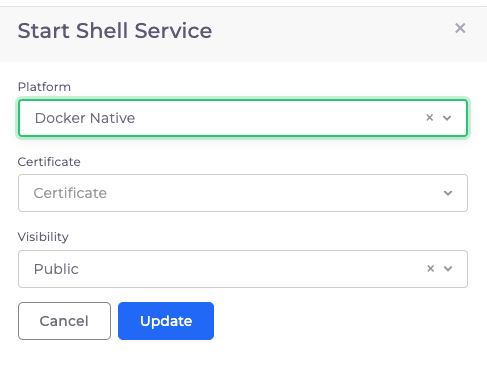
2. From the **Docker** list box, select **Enable Docker Shell**. The **Start Shell Service** pane displays.<br>

   <figure><img src="https://2471407984-files.gitbook.io/~/files/v0/b/gitbook-x-prod.appspot.com/o/spaces%2F68cb0s9ce5UIUKWPuYs8%2Fuploads%2FKqbb1xcofhYV6Qp3R7pF%2FScreenshot%20(169).png?alt=media&#x26;token=202191c9-1ae5-416d-a22d-b4b05522eb3a" alt=""><figcaption><p>The <strong>Services</strong> page with the <strong>Enable Docker Shell</strong> option highlighted</p></figcaption></figure>

<div align="left"><figure><img src="https://2471407984-files.gitbook.io/~/files/v0/b/gitbook-x-prod.appspot.com/o/spaces%2F68cb0s9ce5UIUKWPuYs8%2Fuploads%2F82pYAAeKTer8wRS1zxgf%2Fdocker%20shell.png?alt=media&#x26;token=1f9a0774-2081-4ba7-897a-1f52ed1baa8a" alt="" width="365"><figcaption><p>The <strong>Start Shell Service</strong> pane</p></figcaption></figure></div>

3. In the **Platform** list box, select **Docker Native**.
4. From the **Certificate** list box, select your certificate.
5. From the **Visibility** list box, select **Public** or **Internal**.
6. Click **Update**. DuploCloud provisions the `dockerservices-shell` Service, enabling you to access your Docker container shell.

### Accessing the Shell for Docker

1. From the DuploCloud portal, navigate to **Docker** -> **Containers**.
2. In the row of the container you want to access, click the options menu icon (<img src="https://docs.duplocloud.com/~gitbook/image?url=https%3A%2F%2F2471407984-files.gitbook.io%2F%7E%2Ffiles%2Fv0%2Fb%2Fgitbook-x-prod.appspot.com%2Fo%2Fspaces%252F68cb0s9ce5UIUKWPuYs8%252Fuploads%252F1bULWx4HFiK9TRFeLpk4%252FKabab_three_Vertical_dots.png%3Falt%3Dmedia%26token%3De0fb9551-05e2-4e66-ac2b-c50a23f66acc&#x26;width=20&#x26;dpr=4&#x26;quality=100&#x26;sign=d18bec42&#x26;sv=1" alt="" data-size="line"> ).
3. Select **Container Shell.** A shell session launches directly into the running container.

## EKS Shell Access

### Enabling the Shell for Kubernetes

1. In the **Tenant** list box, select the **Default** Tenant.
2. In the DuploCloud Portal, navigate to **Docker** -> **Services**.
3. Click the **Docker** button, and select **Enable Docker Shell**. The **Start Shell Service** pane displays.

<div align="left"><figure><img src="https://2471407984-files.gitbook.io/~/files/v0/b/gitbook-x-prod.appspot.com/o/spaces%2F68cb0s9ce5UIUKWPuYs8%2Fuploads%2FPU7pYCIBvjhb8U8IWWDs%2Fbrand%20new3.png?alt=media&#x26;token=6b707241-b95c-418d-9494-5fad046a2ef8" alt="" width="386"><figcaption><p>The <strong>Start Shell Service</strong> pane</p></figcaption></figure></div>

4. In the **Platform** list box, select **Kubernetes**.
5. In the **Certificate** list box, select your certificate.
6. In the **Visibility** list box, select **Public** or **Internal**.
7. Click **Update**. DuploCloud provisions the `dockerservices-shell` Service, enabling you to access your Kubernetes container shell.

### Accessing the Shell for Kubernetes

1. From the DuploCloud Portal, navigate to **Kubernetes** -> **Services.**
2. Click the **KubeCtl Shell** button. The Kubernetes shell launches in your browser.

## ECS Shell Access

### Accessing the Shell for ECS

1. From the DuploCloud Portal, navigate to **Cloud Services** -> **ECS**. The **ECS** **Task Definition** page displays.
2. Select the name from the **TASK DEFINITION FAMILY NAME** column.
3. Select the **Tasks** tab.
4. In the row of the task you want to access, click the actions icon **(>\_**).
5. Select the **Task Shell** option. The ECS task shell launches in your browser.

<figure><img src="https://2471407984-files.gitbook.io/~/files/v0/b/gitbook-x-prod.appspot.com/o/spaces%2F68cb0s9ce5UIUKWPuYs8%2Fuploads%2FXx8d4CHILAKSiF0TX8QQ%2Fscreenshot-nimbusweb.me-2024.02.17-14_36_14.png?alt=media&#x26;token=f740ba3e-0cea-4693-ac31-d388b516988f" alt=""><figcaption><p>The ECS Service details page</p></figcaption></figure>


---

# Agent Instructions: Querying This Documentation

If you need additional information that is not directly available in this page, you can query the documentation dynamically by asking a question.

Perform an HTTP GET request on the current page URL with the `ask` query parameter:

```
GET https://docs.duplocloud.com/docs/automation-platform/overview/prerequisites/kubectl-shell.md?ask=<question>
```

The question should be specific, self-contained, and written in natural language.
The response will contain a direct answer to the question and relevant excerpts and sources from the documentation.

Use this mechanism when the answer is not explicitly present in the current page, you need clarification or additional context, or you want to retrieve related documentation sections.