# Autoscaling in Kubernetes

## Prerequisites

Before autoscaling can be configured for your Kubernetes service, make sure that:

1. [Autoscaling Group (ASG)](https://docs.duplocloud.com/docs/automation-platform/overview/use-cases/hosts-vms/auto-scaling/auto-scaling-groups) is setup in the DuploCloud tenant
2. [Cluster Autoscaler](https://docs.duplocloud.com/docs/automation-platform/overview/use-cases/creating-an-infrastructure-and-plan-for-aws/kubernetes-cluster/enable-cluster-autoscaler) is enabled for your DuploCloud infrastructure

## Kubernetes Horizontal Pod Autoscaler (HPA)

Horizontal Pod Autoscaler (HPA) automatically scales the Deployment and its ReplicaSet. HPA checks the metrics configured in regular intervals and then scales the replicas up or down accordingly.

### Configuring Services with HPA

You can configure HPA while creating a Deployment Service from the DuploCloud Portal.

1. In the DuploCloud Portal, navigate **Kubernetes** -> **Services**, displaying the **Services** page.

2. Create a new [Service](https://docs.duplocloud.com/docs/automation-platform/overview/aws-services/containers) by clicking **Add**.

3. In **Add Service - Basic Options**, from the **Replication Strategy** list box, select **Horizontal Pod Scheduler***.* <br>

   <div align="left"><img src="https://2471407984-files.gitbook.io/~/files/v0/b/gitbook-x-prod.appspot.com/o/spaces%2F68cb0s9ce5UIUKWPuYs8%2Fuploads%2FyxxTCC75SaxfD0tTINuL%2Fhpa1.png?alt=media&#x26;token=39e814f4-1e92-445f-8b9b-27e2b49d4ef0" alt="Basic Options on the Add Service page, with Replication Strategy list box and Horizontal Pod Autoscaler Config fields"></div>

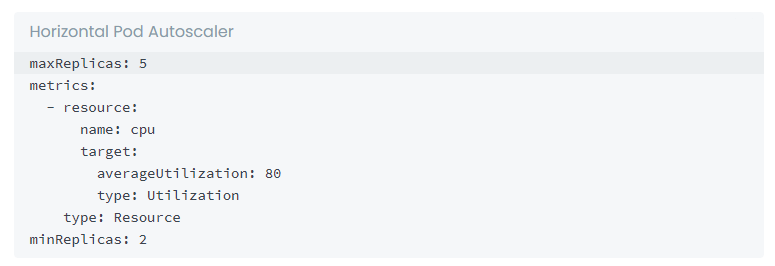
4. In the **Horizontal Pod Autoscaler Config** field, add a sample configuration, as shown below. Update the minimum/maximum Replica Count in the `resource` attributes, based on your requirements. <br>

   <div align="left"><figure><img src="https://2471407984-files.gitbook.io/~/files/v0/b/gitbook-x-prod.appspot.com/o/spaces%2F68cb0s9ce5UIUKWPuYs8%2Fuploads%2FpZofv3oN7dZJ5Zpu8cnd%2Fhpa_Code_block.png?alt=media&#x26;token=aecd646d-81f9-49d1-9917-8fe0570564a8" alt=""><figcaption><p><strong>Horizontal Pod Autoscaler Config</strong> field in <strong>Basic Options</strong>, on the <strong>Add Service</strong> page</p></figcaption></figure></div>

5. Click **Next** to navigate to **Advanced Options**.

6. In **Advanced Options**, in the **Other Container Config** field, ensure your resource attributes, such as `Limits` and `Requests`, are set to work with your HPA configuration, as in the example below.<br>

   <div align="left"><img src="https://2471407984-files.gitbook.io/~/files/v0/b/gitbook-x-prod.appspot.com/o/spaces%2F68cb0s9ce5UIUKWPuYs8%2Fuploads%2FRNbAKMfgChCzdoi8L0vC%2FScreen%20Shot%202022-07-16%20at%2012.02.11%20PM.png?alt=media&#x26;token=5d65b555-1979-4576-a179-c49989cb2991" alt="Other Container Config field in Advanced Options on the Add Service page"></div>

7. At the bottom of the **Advanced Options** page, click **Create**.

{% hint style="info" %}
For HPA Configures Services, **Replica** is set as *Auto* in the DuploCloud Portal
{% endhint %}

When your services are running, **Replicas: Auto** is displayed on the Service page.

<div align="left"><img src="https://2471407984-files.gitbook.io/~/files/v0/b/gitbook-x-prod.appspot.com/o/spaces%2F68cb0s9ce5UIUKWPuYs8%2Fuploads%2FL9z0RQIi8aqTemB6EJan%2Fimage.png?alt=media&#x26;token=cb9f2db8-67f1-4494-9424-bdd3df742bd3" alt="Service page with Replicas: Auto and Status: Running displayed"></div>

### Stopping a running Kubernetes service that is using an HPA

If a Kubernetes Service is running with a Horizontal Pod AutoScaler (HPA), you cannot stop the Service by clicking **Stop** in the service's **Actions** menu in the DuploCloud Portal.&#x20;

Instead, do the following to stop the service from running:

1. In the DuploCloud Portal, navigate to **Kubernetes** -> **Containers** and select the Service you want to stop.
2. From the **Actions** menu, select **Edit**.
3. From the **Replication Strategy** list box, select **Static Count**.
4. In the **Replicas** field, enter **0** (zero).&#x20;
5. Click **Next** to navigate to the **Advanced Options** page.
6. Click **Update** to update the service.&#x20;

### Allowing real-time alerts for autoscaling Kubernetes nodes

When the **Cluster Autoscaler** flag is set and a Tenant has one or more ASGs, an unschedulable-pod alert will be delayed by five (5) minutes to allow for autoscaling. You can configure the Infrastructure settings to bypass the delay and send the alerts in real-time.

1. From the DuploCloud portal, navigate to **Administrator** -> **Infrastructure**.&#x20;
2. Click on the Infrastructure you want to configure settings for in the **Name** list.&#x20;
3. Select the **Settings** tab.
4. Click the **Add** button. The **Infra - Set Custom Data** pane displays.<br>

   <div align="left"><figure><img src="https://2471407984-files.gitbook.io/~/files/v0/b/gitbook-x-prod.appspot.com/o/spaces%2F68cb0s9ce5UIUKWPuYs8%2Fuploads%2F3zVsjPufYh6U6lMq5aQm%2Fscreenshot-nimbusweb.me-2024.03.01-16_40_53.png?alt=media&#x26;token=3b549bb9-61f3-4e3d-b357-304560cd6815" alt=""><figcaption><p>The <strong>Infra - Set Custom Data</strong> pane with <strong>Enables faults prior to autoscaling Kubernetes nodes</strong> enabled</p></figcaption></figure></div>
5. In the **Setting Name** list box, select **Enables faults prior to autoscaling Kubernetes nodes**.&#x20;
6. Set the **Enable** toggle switch to enable the setting.
7. Click **Set**. DuploCloud will now generate faults for unschedulable K8s nodes immediately (before autoscaling).

<figure><img src="https://2471407984-files.gitbook.io/~/files/v0/b/gitbook-x-prod.appspot.com/o/spaces%2F68cb0s9ce5UIUKWPuYs8%2Fuploads%2FeVTCI91e8PsdIdqdkIsa%2Fscreenshot-nimbusweb.me-2024.03.01-16_43_50.png?alt=media&#x26;token=154dda5d-e8a0-472e-8414-357a5bdcdd25" alt=""><figcaption><p>The <strong>Infrastructure-Settings</strong> tab with <strong>Enables faults prior to autoscaling Kubernetes nodes</strong> enabled</p></figcaption></figure>
